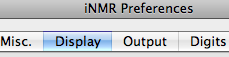
Q. Why is iNMR so slow on my Mac?
A. Because you turned off the option “Retina Display”.

Q. Why is iNMR so slow on my Mac?
A. Because you turned off the option “Retina Display”.
Only the first launch requires authorization. There are 4 different recipes:
Don't use a web browser to download iNMR. Use the Terminal instead! Copy and paste this command:
curl -O https://www.inmr.net/downloads/iNMR_7_0_4.dmg
It will download iNMR 7.0.4 in your current directory (usually your home folder).
If you need a different version of iNMR modify the command accordingly.
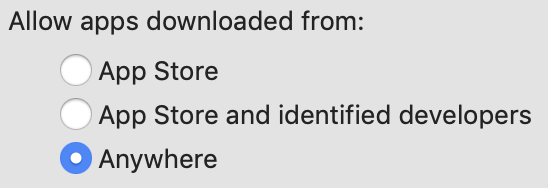
su <admin name>sudo spctl --master-disableQ. Are the above tricks risky?
A. People have being downloading iNMR for 16 years (and Swan-MR in older years) and nobody has been infected. You can, however, increase your safety with the simple md5 checksum.

It depends on you. We accept wire transfers, credit cards and Paypal. Whichever method you choose, you can start the process from the Mestrelab store:
If you are sending a purchase order, payment would be after you have received the license and the invoice.
Basically, we have removed the Save command from the reader. You can copy pictures, print, and create PDF and Postscript documents through the Print dialog. We have also removed the Exporting options and Scripting.
You can use iNMR reader in demo mode and you will pay nothing. Each session lasts a couple of hours, processing is highly automated and you can even save in PNG format.
Officially, we provide free support for one year after purchase. In practice, we give prompt assistance to anybody who calls us, even those who are not our customers. Therefore, we do not feel the need to charge an annual fee for support from our customers. We assist whenever we can. You simply pay € 50 for each major update. Major updates will be spaced more than 3 year apart.
We are required to charge VAT only on orders from Spain (academic or otherwise) and on orders from the EU, excluding Universities and Research Institutes.
There are too many reasons why iNMR and the App store don't fit together:

If you have a “Retina Display”, then it's necessary to turn ON the option with the same name. The command is iNMR > Preferences.
First download the Overview. Then you can read: [1], [2], [3], [4], [5], [6].................
Go to the complete list.
Double click into the plot! For more freedom use the mouse wheel or the keys + and -. Combine with Shift for big steps or with Ctrl for small steps.
You have bought a new Mac and copied your settings from the old one,
including the old key, which refuses to be overwritten by the new key.
Delete ~/Library/Preferences/ByHost/net.inmr.inmr.*.plist.
The cause of the crash is a corrupted Preferences file.
Delete ~/Library/Preferences/net.inmr.inmr.plist.
Don't waste your time when something seems impossible. Pull down the Help menu and select the command (“email support”). It's fast and free.
Open the Font Panel and select a new font or a different size.
Ctrl-click the reference peak...
There is only one way: change the scale reference in one of them. Never use the offset controls of the Overlay Manager to align two spectra.
Please cite iNMR like the following:
iNMR (http://www.inmr.net).
If you have a Mac, just download iNMR and find out the answer for yourself! Otherwise, read the list of supported formats. If your format is not supported, please send us a sample file even if you have no intention of buying. We are committed to cover all plausible NMR formats.
When you choose any file inside a Varian folder, iNMR will always open the file called “fid”. When you choose any file inside a Bruker folder, iNMR will always open a Bruker spectrum. If you want to open a NMRPipe file, move it out of those folders.
You don’t ever really need to worry about saving because it is all automatic. If you really want to know, the command you are looking for is called “Export” and it should be used only to create duplicates, never as a routine operation. Read more.
Go to the “Finder” and duplicate the file. You can duplicate the original file(s)
coming from the spectrometer and/or the iNMR document. If you duplicate everything,
it will take more space on disc. It may also generate future trouble (as you may forget
which files to store and which to throw away). The advantage is that both versions will
be listed under the “Open Recent...” menu.
If you duplicate the .inmr file only, the two files will be listed only once in the menu
(and not twice), as they will be both pointing to the same original data file from the spectrometer.
You can however open the second copy using the Open command or by double clicking on the file name.
An arrayed experiment requires a single FT only. Open the dialog: “Edit/Metadata”. Change the value for the f1 nucleus into a dot: “.” (without the quotes). Once you save this change, it's difficult to revert it (try opening the dialog again...). To revert: open the *.inmr file with the “Property List Editor”. Unfold to reach the element: Root/spectroscopy/NMR coordinates/0/atom. Remove the dot.
Use the command “Process Folder” to create a pseudo 2-D matrix.

When a number follows a character, it is written as a subscript. When a number does not follow a character, but is followed by a character, it is written as a superscript.
There are 3 alternative solutions:
Ctrl-click the hiding annotation and select the command “Send Back”.
This happens when you want to use the contextual menu for peaks and the menu for annotations appears instead. The combination Cmd-Shift-L solves the problem.
Pick the “Bracket” tool, create a bracket and double click it. In the dialog that appears, choose the options you like.
Use the option clipping rect.
You can, actually! Pull down the “View” menu, uncheck “Peak Labels” and check “Document Notes”. Alternatively, Ctrl-click on an existing Peak Label and convert it to a Doc Note. Explanation: Peak Labels are restricted to the spectral range, while Doc Notes can go anywhere.

It's because there is not enough space on the left. You can drag the left margin of the plot with the mouse. For a definitive solution, go to the preferences dialog. In the second panel, on the center-left, set 1D Margins (left & right) = 50 or more.
Go to the preferences dialog. In the second panel, at the bottom-left, set Short Distance = 0.
Choosing and Buying Our Products
Being a User
Files
Annotations
Rarely Asked Questions